Registering a Content Block (component)
Content blocks are pre-fabricated units of layout, content and design. On the Godrej Design Lab website, these are implemented using Strapi's components.
This page chapter will cover registering and implementing a content block.
Quote block
Let's walk through building a quote block.
1. Define the component
A component definition is a file that describes the component, the fields it has and how it is to look on the Strapi dashboard.
When viewed on the admin dashboard, components show up grouped by their category. Every component must belong to a category.
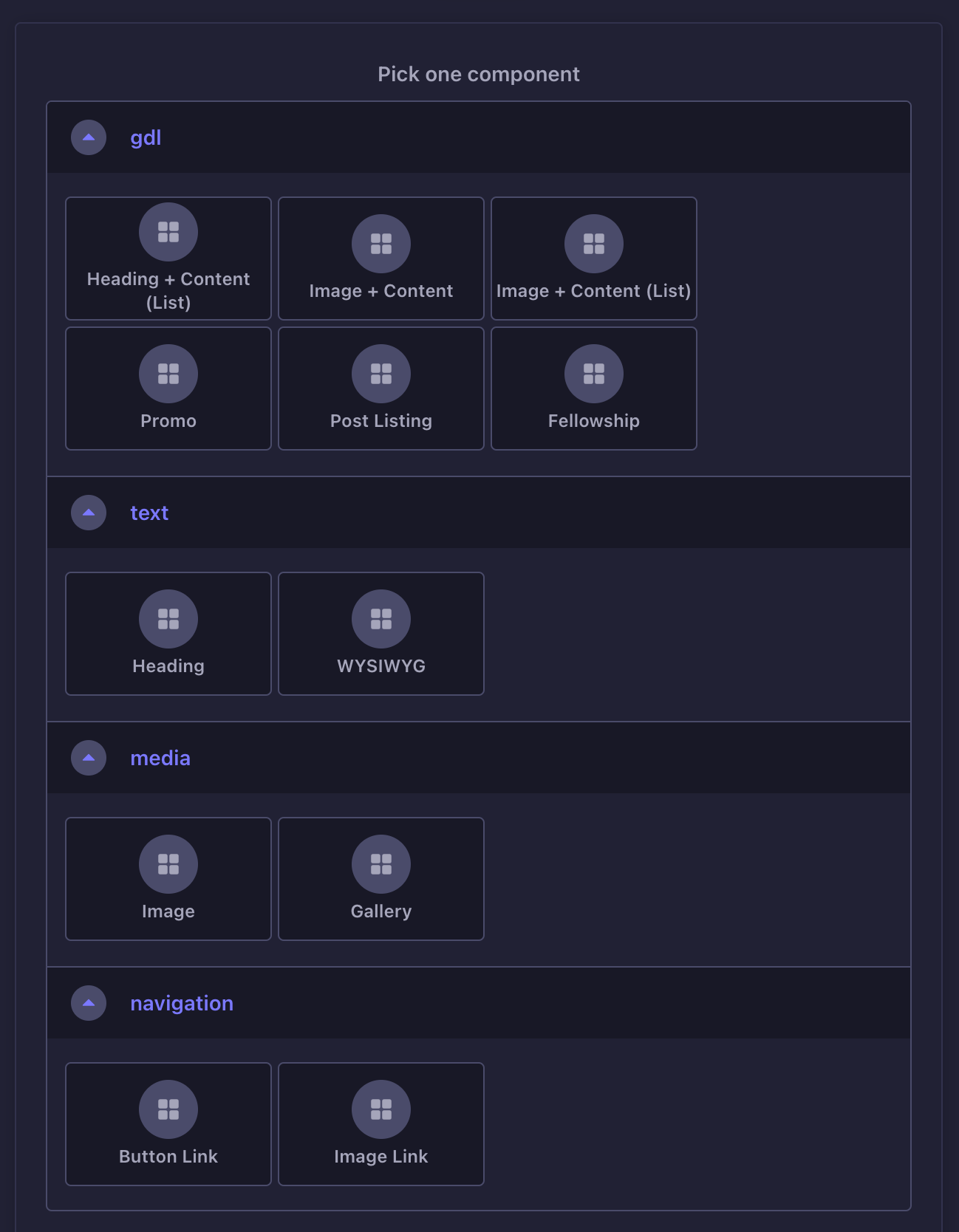
Component definitions are stored at /apps/cms/src/components/<category>/, where <category> is the name of the category that the component belongs to. Component categories do not require an explicit registration step. Simply placing the quote component's definition at /apps/cms/src/components/text/quote-v1.json implicitly creates a "text" category. And that's what we'll do for this component.
The category name for a component is not limited to a predefined set of terms.
It can literally be anything—foo, bar, bath.
{"collectionName": "components_text_quote_v1","info": {"displayName": "Quote","description": "Add visual emphasis to a phrase of text"},"options": { },"attributes": {"content": {"type": "text"},"font_family": {"type": "enumeration","enum": ["sans-serif","monospace"],"default": "sans-serif","required": true}},"__": {"What's this?": "Metadata for this schema. Strapi will ignore this, but our code will read and write it onto the database.","metadatas": {"content": {"edit": {"label": "Content","description": ""},"list": {"label": "Content"}},"font_family": {"edit": {"label": "Font Family","description": ""},"list": {"label": "Font Family"}}},"layouts": {"edit": [[{ "name": "font_family", "size": 6 }],[{ "name": "content", "size": 12 }]]}}}
The component is identified by the collectionName attribute. The value provided is components_text_quote_v1. This is the syntax for a component's name:
- the
componentsprefix, followed by - the component's category (
text), and finally - the component name (
quote_v1).
All the parts are separated by an underscore.
So we have two attributes for this component — content and font_family.
To learn more about the various attributes Strapi has, refer to their documentation.
By default, the layout/presentational aspects of attributes are only configurable from the dashboard. The __ key you see in the definition adds support for configuring them via code. While it is ignored by Strapi, we have custom code that parses and configures this.
Alright, the quote component has been defined. But when we try to add it to a post, it is simply nowhere to be found on the Strapi dashboard.
2. Make component accessible within Strapi
On the Strapi dashboard, you won’t see the quote component anywhere and hence are unable to add it to your post.
In this project, most components are accessible only from within a section component. Hence, you’ll need to edit the section component's definition file and include the quote component in it, among the list of allowed components.
{"collectionName": "components_container_section_v1","info": {"displayName": "Section","description": "A standalone section of the page."},"options": { },"attributes": {// ..."content": {"type": "dynamiczone","components": [// ..."gdl.fellowship-v1","text.heading-v1","text.wysiwyg-v1","text.quote-v1",// ...]}},"__": {// ...}}
In quote-v1.json, the name provided is components_text_quote_v1. But when referring to the component in section-v1.json, it is text.quote-v1.
The name that is assigned to a component and the name by which it is referred to from the outside are not the same:
- The
componentsprefix is dropped. - The category and the name are separated by a
.(instead of an underscore). - The component name itself is slugified, i.e all word separators (
_in this case) are replaced with hyphens (-).
Okay, we can see the component on Strapi now. We add a quote to a post. But when the post is viewed on the frontend, it is nowhere to be seen.
3. Populate component in API response
The reason you don't see the quote on the frontend is because the quote component data isn't being returned from the REST API.
As covered in the Querying Content from Strapi page, chapter, component attributes aren't auto-populated in the API response.
Add the following to /apps/frontend-website/src/cms/utilities/fetch-route-from-cms.ts:
function prepare_request_payload ( search_params: URLSearchParams ) {const populate_all = { populate: "*" }const populate_v1_attributes = {// ..."text.wysiwyg-v1": populate_all,"text.quote-v1": populate_all,// ...}// ...}
The above addition tells Strapi to include all the quote component data in the API response.
But on refreshing the page, you still don't see the quote.
4. Implement the component parser/renderer
On the brower console, you’ll see a log that looks like this (roughly):
Doesn't exist: {"id": 5,"__component": "text.quote-v1",}
This is because the transformer/renderer for the quote component has not been implemented yet.
Create a quote.tsx file at /apps/frontend-website/src/cms/components/ with the following content:
import { Link } from "react-router"import { shallow_clone_props } from "../utilities/shallow-clone-props"export class Quote {static id = "text.quote-v1"static process_node ( props ) {return shallow_clone_props( props )}static Renderer ( { content, font_family, className }: { content: string, font_family?: string, className?: string } ) {const font_family_class = font_family === "monospace" ? "font-mono" : "font-sans"return <div className={ `wysiwyg mt-6 md:mt-8 lg:mt-10 [&>:first-child]:mt-0 ${ className }` }><blockquote className={ `mt-6 md:mt-8 lg:mt-10 md:-ml-1c-1g lg:-ml-2c-2g md:py-10 lg:py-20 ${ font_family_class }` }><p className="text-h3 md:text-h2 lg:text-h2 font-bold text-secondary">{ content }</p></blockquote></div>}}
Even after all this, the quote is not seen on the frontend.
5. Register the component transformer/renderer
The final step involves registering the quote's transformer/renderer function with the component manifest.
Add the following to /apps/frontend-website/src/cms/component_map.ts:
// ...import { WYSIWYG } from "./components/wysiwyg"import { Quote } from "./components/quote"// ...export const component_map = {// ..."text.wysiwyg-v1": WYSIWYG,"text.quote-v1": Quote,// ...}
The Quote named export (from the previous step) is added.
That's it. Now you should see the quote on the frontend.