Content Parser and Renderer
Content on Godrej Design Lab is composable and flexible. Every piece of content is opt-in; a page can include a gallery only if it is required. No fixed structure is imposed, allowing each page to adapt to its unique needs. While this level of flexibility is still relatively new to most CMS platforms, it is not a novel concept.
This website introduces the notion of blocks (term borrowed from WordPress' Gutenberg project), which are pre-fabricated units of layout, content and design.
An author picks a block that best represents the look and feel they are going for, then plugs in the text and voila, they have a piece of content that looks presentable. By stitching a series of such block together, you end up with a page. That's it really. It's that simple.
Now unlike WordPress Gutenberg, Strapi only has limited support for composable content authoring.
The content architecture for the GDL website heavily relies on:
- dynamic zones
- components
- nesting components within components
The latter is not officially supported by Strapi, yet it is key to enabing a composable architecture.
For example, the section-v1 component has a content attribute which itself is a dynamic zone of other components.
Several other components are structured this way.
Shape of the content
When querying the content for a post, we get back a deeply nested data structure.
{"id": 17,"contentType": "api::post.post","__component": "container.page-layout-v1","documentId": "tsj7l21abpliz2nq9oiok37k","toc": true,"title": "Murubi: Jaymin Panchasara & Shwetha Iyengar","createdAt": "2025-07-19T17:18:28.003Z","updatedAt": "2025-07-29T17:04:09.276Z","publishedAt": "2025-07-29T17:04:10.560Z","page_context": {"id": 1,"documentId": "paa9ijdf7jaj7286jcjueexi","name": "Default","site_title": "Godrej Design Lab","site_description": "It's a design lab.","createdAt": "2025-07-18T21:16:50.356Z","updatedAt": "2025-09-06T11:55:14.444Z","publishedAt": "2025-09-06T11:55:14.386Z","blurb": [// ...],"cover": {"id": 12,"documentId": "thw6g0mmp2u1dcx7tkhodzde","name": "about-fellowship-2.jpg",// ..."url": "/uploads/about_fellowship_2_38b21dd13b.jpg",// ...},"navigation": [{"id": 1,"label": "About","url": "/about-godrej-design-lab"},// ...],"featured_links": [{"id": 6,"label": "North: Rahul Bhusan","url": "/posts/north-rahul-bhusan"},// ...],"arbitrary_code": {"id": 1,"before_head_closing": [{"__component": "code.script-v1","id": 1,"type": "text/javascript","src": "https://www.googletagmanager.com/gtag/js?id=A_TAG_ID","code": null,"async": true,"defer": null,"cross_origin": "anonymous","integrity": null,"nonce": null,"referrer_policy": "strict-origin-when-cross-origin"},{"__component": "code.script-v1","id": 2,"type": "text/javascript","src": null,"code": "window.dataLayer = window.dataLayer || [ ]\nfunction gtag () {\n\tdataLayer.push( arguments )\n}\ngtag( \"js\", new Date() )\ngtag( \"config\", \"A_TAG_ID\" )","async": null,"defer": null,"cross_origin": "anonymous","integrity": null,"nonce": null,"referrer_policy": "strict-origin-when-cross-origin"}],"after_body_opening": [],"before_body_closing": []}},"color_scheme": {"id": 12,"documentId": "vkb07gmnfnizwuxk9z00jxk5","name": "Blue-gray | Indigo",// ...},"cover": null,"header_region": {"id": 51,"content": [{"__component": "container.section-v1","id": 162,"register_with_toc": true,"title": "Introduction","collapsible": false,"collapsed_by_default": null,"heading": {"id": 140,"level": "h1","line_2": "Jaymin Panchasara & Shwetha Iyengar","line_1": "Murubi","font_family": "sans-serif","link": null},"content": [{"__component": "text.wysiwyg-v1","id": 93,"content": [{"type": "paragraph","children": [{"type": "text","text": "2024 GODREJ DESIGN LAB FELLOW","code": true}]}],"font_family": "sans-serif","layout": "full-width"},// ...]}]},"side_region": null,"main_region": {"id": 45,"content": [{"__component": "container.section-v1","id": 163,"register_with_toc": true,"title": "From the GDL Team","collapsible": false,"collapsed_by_default": null,"heading": {"id": 141,"level": "h4","line_2": null,"line_1": "From the GDL Team","font_family": "sans-serif","link": null},"content": [{"__component": "text.wysiwyg-v1","id": 94,"content": [{"type": "paragraph","children": [{"type": "text","text": "In a sea of sameness, Shwetha and Jaymin’s work stands out in the growing design-brand scene. Beyond their contemporary-but- approachable visual style, there is deep thought and attention to the typically unseen: how materials come together, how products are packed, assembled, and how parts are, eventually, replaced.","code": true}]},{"type": "paragraph","children": [{"type": "text","text": "We were quite interested in how this commitment to “the whole” would be applied in their new and evolving collection. It has been really exciting to see how at-length, on-site trips have enabled them to go beyond just using an invasive species within designs but to come up with ways to use their eye for design and technical details to use and add value to what other brands consider “not usable” and undesirable.","code": true}]}],"font_family": "sans-serif","layout": "normal"}]},// ...]}}
This structure can be viewed as a flipped tree, where you have a root node, followed by its children, and in turn descendants of their own, and so on. The nodes that have no children are referred to as leaves.
This is a very common data structure in computer science. HTML is a good example of this. You have the <html /> tag at the top, with the <head /> and <body /> tags as its children, and so on.
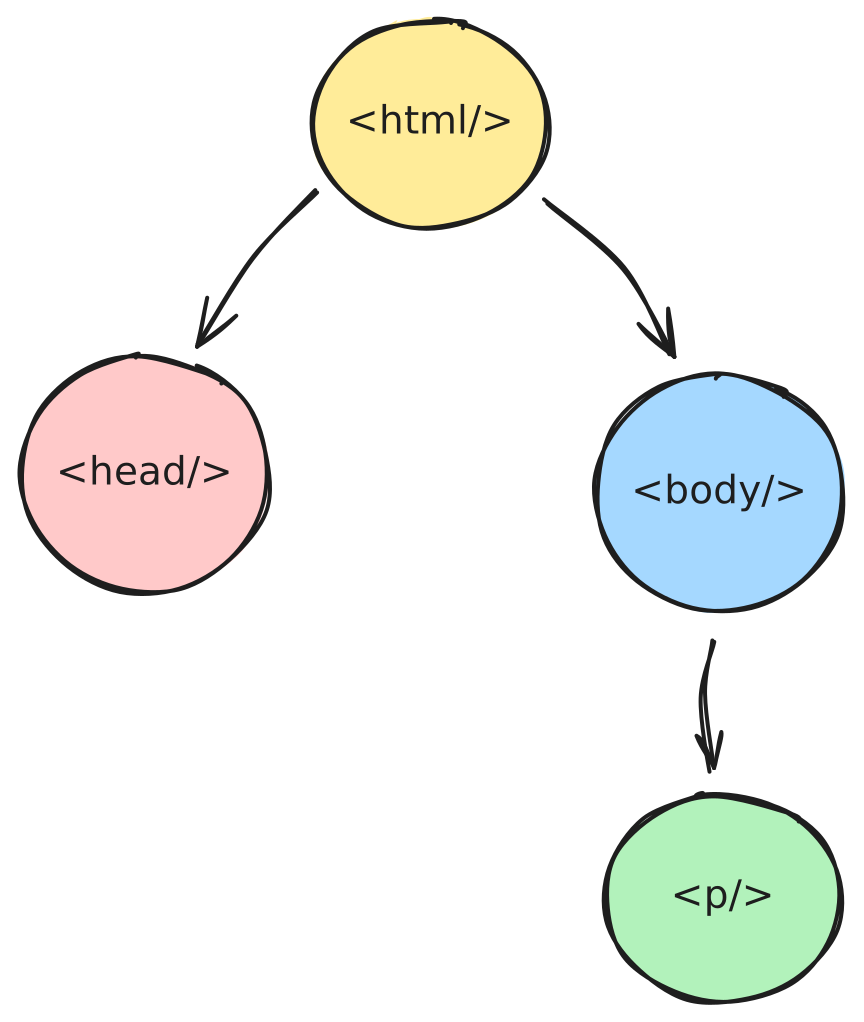
Another example of this structure is an abstract syntax tree (AST), which is used to represent the structure of a program or block of code.
Content parser
Generating the final markup for a post requires traversing this tree data structure, visiting each node one-by-one and rendering them individually.
However, in some instances, a node is not rendered. Rather, it is transformed to a different node (or a sub-tree with multiple nodes). This is simply the requirement in such instances. The nodes resulting from this transformation are then themselves traversed and rendered.
This is similar to how browsers generate the complete markup from the HTML it receives. Consider this minimal HTML file:
<p>A minimal paragraph.
It comprises of a just a single paragraph. The closing tag is missing. Yet it is still valid HTML.
However, before the browser can actually move onto the subsequent stages of the rendering pipeline, it needs to first plug in the gaps and expand the provided code to a highly versbose, "complete" version of the HTML.
When viewing the above HTML in the Elements panel of a browser's devtools, you'll see this instead:
<html><head></head><body><p>A minimal paragraph.</p></body></html>
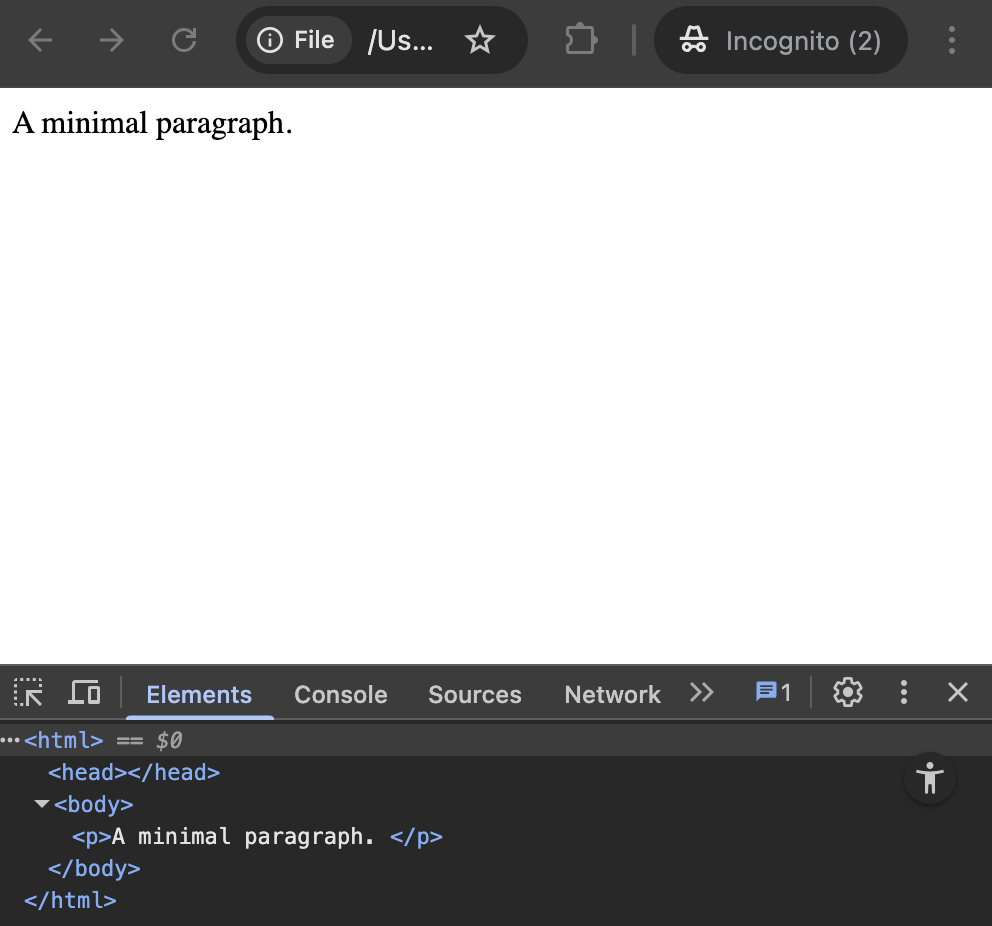
As you can see, the browser expanded on the code that it received; scaffolded out the foundational structure (the root tags) that is necessary, and plugged in the paragraph's missing closing tag.
Now to traverse this tree and render the content, a "parser" is required.
A simple content parser
On first glance, the content parser code you see in the codebase can be quite overwhelming. So let's walk through a simplified version of what this looks like.
Shape of a post's content
The payload that Strapi returns (to the frontend server) is somewhat along these lines:
[{__type: "paragraph",fontFamily: "sans-serif",content: "This is a paragraph."},{__type: "section",content: [{__type: "paragraph",fontFamily: "monospace",content: "This is also a paragraph."},]}]
The above tree data structure needs to be tranformed into:
<p class="font-sans">This is a paragraph.</p><section><p class="font-mono">This is also a paragraph.</p></section>
01. Implement node renderers
These are simply React components. A paragraph node is rendered with a Paragraph React component, and a section node is rendered with a Section React component.
function Paragraph ( { fontFamily, children } ) {const font_family_classes = {"serif": "font-serif","sans-serif": "font-sans","monospace": "font-mono",}return <p className={ `${ font_family_classes[ fontFamily ] }` }>{ children }</p>}function Section ( { children } ) {return <section>{ children }</section>}
02. Build a node manifest
This is essentially a map that connects nodes to their React component renderers.
const component_map = {paragraph: Paragraph,section: Section}
03. The tree parser/traverser
This is a function that takes the content of a post, traverses it, transforms and finally renders each node to produce the markup.
function renderNode ( node ) {if ( typeof node === "string" ) {return node}const { __type, children, ...props } = nodeconst Component = component_map[ __type ]if ( ! Component ) {console.warn( `Unknown component type: ${ __type }` );return null}const childElements = Array.isArray( children )? children.map( ( child, index ) => <React.Fragment key={ index }>{ renderNode( child ) }</React.Fragment> ): renderNode( children )return <Component { ...props }>{ childElements }</Component>}function renderTree ( data ) {return data.map( function ( node, index ) {return <React.Fragment key={ index }>{ renderNode( node ) }</React.Fragment>} )}
renderNode renders a single, individual node and its children recursively.renderTree renders an array of nodes.
04. Usage
const treeData = [/* post content data structure */]function PageContainer () {return <main>{ renderTree( treeData ) }</main>}
The renderTree function is called only once on the content data that is received from the database.
The renderNode function handles the rest of the rendering.
On this project
Content parsing and rendering
The render_strapi_component function (in strapi-component-renderer.tsx) is the equivalent of the renderNode and renderTree functions (combined) described above.
The function is used in the cms-route-handler.tsx route handler file.
Component (node) renderers
The renderer (or tranformer) functions for every node can be found in the apps/frontend-website/src/cms/components folder.
On browsing the codebase, you'll only encounter the term component and not node (which is the term we've used here).
Strapi already has a notion of a "component" and hence we decided to stick to that verbiage.
Consider the image component renderer:
export class Image {static id = "media.image-v1"constructor ( file ) {return {__component: Image.id,file,}}static process_node ( props ) {return shallow_clone_props( props )}static Renderer ({ file, aspect_ratio = "natural", className = null }: { file: unknown, aspect_ratio?: string, className?: string | null }) {const { src, src_set } = useImageURLs( file )let rest_props = { }if ( src_set ) {rest_props.srcSet = src_set}return <><link rel="stylesheet" href={ stylesheet } precedence="medium" /><figure className={ `image mt-6 md:mt-8 lg:mt-10 _overflow-hidden ${ className }` }><img decoding="async" src={ src } alt={ file.alternativeText } className={ `${ aspect_ratio_to_class__map[ aspect_ratio ] } object-cover rounded-md` } loading="lazy" { ...rest_props } />{ file.caption && <figcaption className="mt-2 font-mono text-xs">{ file.caption }</figcaption> }</figure></>}}
Every component renderer/tranformer file is structured in this way — a class with a few (static) methods:
Renderer: Contains the render logic and presentation for the componentprocess_node: The tranformer function (that is invoked byrender_strapi_componentas it traverses the content data structure) wherein the shape of the component/node can be either mildly re-structured or complete transformed into a sub-tree of components. In most instances (except for the gallery component), the component is simply cloned and returned. We've noticed some issues if the component isn't cloned and is instead directly mutated.constructor: If theprocess_nodefunction (mentioned earlier) transforms a component into a sub-tree of other components, it invokes those components' constructor functions.